
If you’re on the hunt for a new role and want to let your network know, LinkedIn makes it easy with their Open to Work feature. To add the Open to Work option, go to your LinkedIn profile page, click the “Open to work” button, select “Finding a new job,” and fill in your job preferences like job titles, location, and job types.
Here’s a quick overview:
- Go to your LinkedIn profile
- Click “Open to work” → “Finding a new job”
- Add your target job titles, location types, and employment types
- Choose who can see your job search status
- Save your settings
That’s it! Simple right?
But if you’re here, you’re probably also wondering: “Should I actually turn this on?“
Because in today’s competitive job market, job seekers aren’t just trying to apply, they’re trying to be found.
And that’s where the Open to Work LinkedIn feature can make a real difference.
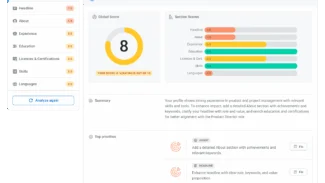
Before you turn it on, it’s worth checking how your profile is positioned. A quick scan with our LinkedIn Profile Analyzer can help you see if your profile is ready to attract the right opportunities.
When it comes to LinkedIn, you should keep in mind, recruiters use LinkedIn to search for candidates not wait for applications. And the Open to Work feature helps you show up in those recruiter searches when you’re actively exploring new opportunities.
In this step-by-step guide, we’ll walk through how to set it up, when to use it, and how to make sure it actually leads to real opportunities.
How to Add Open to Work on LinkedIn (Step-by-Step)
Adding Open to Work on LinkedIn is simple, but setting it up strategically is what makes it effective. Below we will guide you through the process with screenshots from a Certified Digital Career Strategist’ (CDCS) profile.
Here’s how to do it:
Step 1. Go to your LinkedIn account and open your LinkedIn profile page
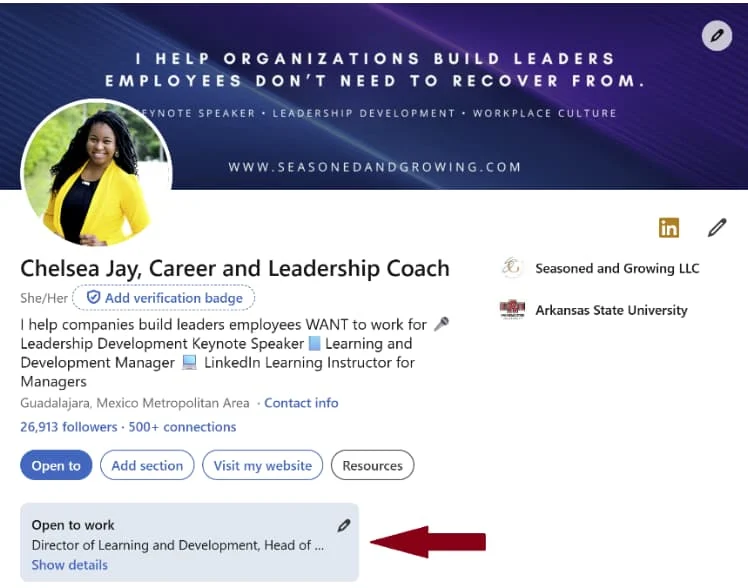
Step 2. Locate the “Open to work” button below your profile picture and click on the pencil to edit.
Step 3. Add your job preferences:
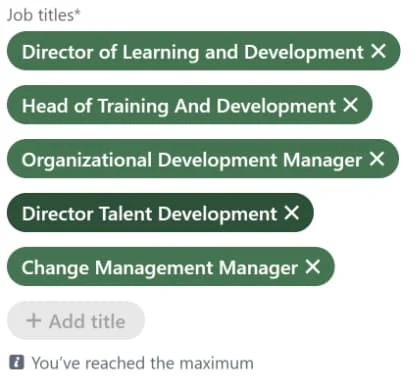
- Job titles that reflect your target roles (you can add up to 5)
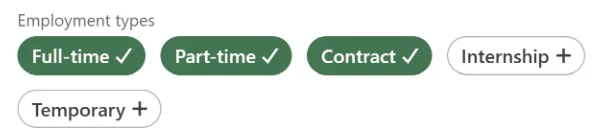
- Job types (full-time, part-time, contract, etc.)
- Preferred location or remote roles
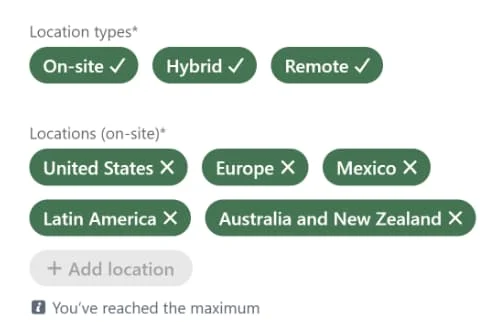
- Start date and job availability
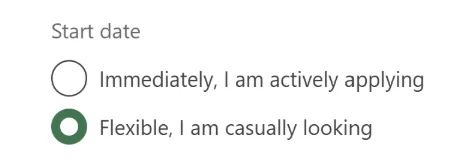
Step 4. Choose your visibility:
- Recruiters only
- All LinkedIn members (adds the green banner / green photo frame)
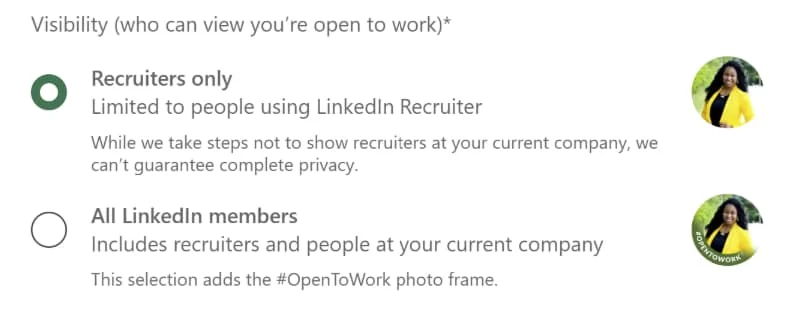
Step 5. Click Save
Once this is active, your profile becomes more visible in recruiter searches.
But here’s the part most people miss…
This doesn’t guarantee job offers. It increases your profile’s visibility, but what happens next depends on how strong your LinkedIn presence is.
What Is LinkedIn’s Open to Work?
LinkedIn’s Open to Work feature is designed to help job seekers let recruiters, hiring managers, and talent acquisition teams know that they’re open to new job opportunities.
Instead of relying only on job boards and submitting endless applications, this feature helps you show up in recruiter searches based on:
- Job titles
- Skills
- Job preferences
- Years of experience
You can also add the green #opentowork frame to your profile picture, making your job search status visible to your entire network. Afterall, you never know who may have an opportunity for you.
Is Open to Work on LinkedIn a Good Idea?
Just like with all things, the answer is, it depends! Mostly on your mindset and goals. The Open to Work feature causes hesitation, fear, and doubt for many professionals. The most common question asked is usually, “does open to work make me look desperate?”
The quick answer is NO. Especially for the audience you are trying to appeal to.
Recruiters don’t see this feature as a bad idea. They see it as a signal that you’re open to new opportunities and ready for your next role.
In fact, many recruiters prioritize candidates who have this turned on and depending on how optimized your profile is, it can work in your favor.
When it works in your favor:
- Your profile clearly reflects your target roles
- You use job-specific keywords aligned with recruiter searches
- Your experience shows measurable results
When it doesn’t:
- Your profile is incomplete or outdated
- Your job titles are unclear or inconsistent
- Your skills don’t match your target roles
The real problem isn’t using Open to Work, it’s using it without a strong LinkedIn profile behind it. (Opportunity to say: If you are ready to fully optimize your profile, check out our step-by-step guide, How to Optimize your LinkedIn Profile.)
How to Change Your LinkedIn Open to Work Settings
Your LinkedIn Open to Work settings aren’t something you set once and forget. They are also not permanent.
As your job search evolves, whether you’re refining your target roles, becoming more selective, or getting closer to your next opportunity, you can (and should) update your settings to reflect that.
LinkedIn makes it easy to adjust everything at any time.
Change Your Job Preferences
Your job preferences tell LinkedIn (and recruiters) what kind of roles you’re actually interested in. This is one of the most important parts of the feature and one of the most commonly overlooked.
To update your job preferences:
- Go to your LinkedIn profile page
- Click the Open to Work section
- Select Edit preferences
- Update:
- Job titles (your target roles)
- Job types (full-time, contract, remote work, etc.)
- Location preferences
- Start date and job availability
This helps you stay aligned with your next opportunity, not just your current role.
How to Change Open to Work Visibility on LinkedIn
You can control exactly who sees your Open to Work status.
This is especially important if you’re currently employed and don’t want your current employer to see your job search activity.
LinkedIn gives you two options:
- Recruiters only: Your status is visible only to LinkedIn Recruiter users and talent acquisition teams
- All LinkedIn members: Your entire network can see your status, including the green #opentowork frame on your profile picture
If privacy matters, the recruiter-only setting is usually the safest choice, but if visibility is your priority, the public option can increase profile views and engagement.
How to Turn Off or Remove Open to Work on LinkedIn
You can turn off Open to Work at any time, whether you’ve found a new role, paused your job search, or simply want to remove the green banner.
Here’s how to remove Open to Work on LinkedIn:
- Go to your LinkedIn profile
- Click the Open to Work section
- Select Edit preferences
- Click Delete from profile
This will:
- Remove your job search status
- Remove the green photo frame
- Stop your profile from being prioritized in recruiter searches
Who Can See Open to Work on LinkedIn?
It depends on your settings. It can be visible to recruiters only or to all LinkedIn members with the green banner. Below is a quick reference table for you to refer to.
| Visibility Setting | Who can see it |
|---|---|
| Recruiters only | Only LinkedIn recruiters using LinkedIn Recruiter |
| All LinkedIn members | Only LinkedIn recruiters using LinkedIn Recruiter |
Why You Should Optimize Your Resume and LinkedIn Before Using Open to Work
Turning on Open to Work without optimizing your profile is one of the most common mistakes job seekers make.
It increases your visibility, but visibility alone doesn’t create results.
Before using it, make sure your LinkedIn profile includes:
- A keyword-rich headline aligned with your target roles
- A clear summary section that reflects your value proposition
- Experience that highlights measurable achievements
- Relevant skills that match job descriptions
If you’re not sure where you stand, our LinkedIn profile checker can help you identify gaps and improve your profile’s visibility.
Common LinkedIn Open to Work Mistakes to Avoid
Turning on Open to Work is simple but using it effectively is where most job seekers get stuck.
If you’ve ever felt like you’re doing everything “right” and still not getting results, one of these common mistakes may be the reason.
- Turning On Open to Work With an Incomplete Profile – This is one of the biggest mistakes many job seekers make. Open to Work increases your profile’s visibility in recruiter searches. But if your LinkedIn profile isn’t fully built out, that visibility doesn’t lead anywhere.
- Using Vague Job Titles That Don’t Match Recruiter Searches – Your job titles play a major role in whether you appear in search results.
- If your profile uses titles like:
- “Professional”
- “Consultant”
- “Open to opportunities”
- You’re making it harder for LinkedIn’s search algorithm to understand where you fit. Instead, use job titles that reflect your target roles and match common recruiter searches.
- If your profile uses titles like:
- Selecting Too Many Job Types or Target Roles – It’s tempting to check every option, especially when you’re open to new opportunities. But when your preferences are too broad, your profile can become harder to categorize.
- Not Updating Your Job Preferences Regularly – Your job search will evolves and your settings should reflect that. If your Open to Work preferences don’t match your current goals, you may miss out on the right opportunities.
- Relying Only on Easy Apply Instead of Building Connections – Open to Work is only a tool, it’s not a complete job search strategy. The most effective approach combines a strong profile, connections, and engagement with your network.
Key Takeaways
Adding Open to Work on LinkedIn is one of the easiest ways to increase your visibility during a job search.
But the real difference comes from how well your profile supports it.
When your LinkedIn profile is clear, aligned, and optimized, this feature helps connect you to real opportunities, not just more applications.
If you’re ready to take the next step, review your profile with ResumeCoach’s LinkedIn optimization tool to make sure you’re showing up for the right roles.
Struggling with Resume Writing?
Ease the process with our templates
FAQs About LinkedIn Open to Work
If you’re unsure whether you’ve set up Open to Work correctly or wondering why it’s not getting results, you’re not alone.
Here are answers to the most common questions job seekers have about LinkedIn Open to Work.
Your Open to Work status may not appear if your visibility is set to recruiters only, your settings are incomplete, or your profile lacks relevant keywords.
Go to your LinkedIn profile, click the Open to Work section, edit your preferences, and select “Delete from profile.”
No. When used correctly, it increases your profile’s visibility and helps recruiters find you faster.
Your profile may not be aligned with recruiter searches, lack relevant keywords, or not clearly reflect your target roles.
Related Posts